antiSMASHは生合成遺伝子クラスター(BGC)の検出やアノテーションに広く利用されているが、その標準的なワークフローは大規模なメタゲノム・アセンブリには適していいない。膨大な数のコンティグが深刻な実行時間のボトルネックとなり、その後の結果の解析や確認を複雑にするためである。そこで本著者らは、メタゲノム規模でのBGC解析を目的としてantiSMASHを再設計・派生させたツールmetaSMASHを開発した。metaSMASHは、antiSMASH本来の検出・アノテーション・ロジックを維持しつつ、ストリーミング処理、メモリ使用量を制限した実行、レコード単位の並列化、出力フィルタリング機能、そして大規模な解析結果を扱うためのインタラクティブなダッシュボードを導入した。25種類のメタゲノム・ベンチマーク・データセットを用いた検証において、metaSMASHはantiSMASHと同一のBGC検出結果を再現しつつ、計算コストを劇的に削減した。標準的なantiSMASHの設定と比較すると、metaSMASHは幾何平均で38倍高速だった。また、暫定的に構築されたチャンク分割(分割処理)型antiSMASHワークフローと比較しても優れた性能を示した。標準設定では幾何平均2.9倍の高速化とピークメモリ使用量の1.7倍の削減を達成し、拡張解析モジュールを有効にした場合でも、2.7倍の高速化とメモリ使用量の3.1倍削減を実現しつつ全データセットの解析を完了した。一方、暫定的なワークフローでは、最大規模の2つのアセンブリにおいてメモリ不足(OOM)が発生した。結果の同等性を損なうことなく大規模メタゲノム解析の計算負荷を大幅に低減するmetaSMASHは、アセンブルされたメタゲノムからのBGCマイニングを日常的な作業としてより実用的なものにし、複雑な微生物群集からの天然物探索に向けたスケーラブルな基盤を提供する。
AntiSMASH documentation
https://docs.antismash.secondarymetabolites.org/
インストール
windows11のWSLに導入した(macでは依存関係のエラーが発生した。macではdockerの使用を推奨)
Github
mamba create -n metasmash -c bioconda -c conda-forge metasmash -y
conda activate metasmash

#docker
docker pull quay.io/biocontainers/metasmash:0.1.3--pyhdfd78af_0
>metasmash --help
metasmash --help
########### metaSMASH 0.1.3 #############
usage: metasmash [-h] [options ..] sequence
arguments:
SEQUENCE GenBank/EMBL/FASTA file(s) containing DNA.
--------
Options
--------
Help options:
-h, --help Show basic help text.
--help-showall Show full list of arguments.
Basic analysis options:
-t {bacteria,fungi}, --taxon {bacteria,fungi}
Taxonomic classification of input sequence. (default:
bacteria)
-c CPUS, --cpus CPUS How many CPUs to use in parallel. (default for this
machine: 10)
--workers WORKERS Number of parallel worker processes for Phase 2
(analysis). Each worker gets cpus/workers threads.
Phase 1 (detection) always uses --cpus workers x 1
thread regardless of this flag. Lower values reduce
peak memory. (default: min(cpus, max(2, cpus // 4)) —
~cpus/4, min 2)
--databases PATH Root directory of the databases (default:
/usr/local/lib/python3.11/site-
packages/antismash/databases).
Output options:
--output-dir OUTPUT_DIR
Directory to write results to.
--output-basename OUTPUT_BASENAME
Base filename to use for output files within the
output directory.
--output-skip-records-without-regions, --no-output-skip-records-without-regions
Exclude records without detected regions from JSON and
GBK output files. Skipped record names are still
logged. (default: True)
--html-title HTML_TITLE
Custom title for the HTML output page (default is
input filename).
--html-description HTML_DESCRIPTION
Custom description to add to the output.
--html-start-compact Use compact view by default for overview page.
--html-ncbi-context, --no-html-ncbi-context
Show NCBI genomic context links for genes (default:
False).
--html-taxonomy PATH Path to a two-column TSV file mapping contig IDs to
taxonomy lineages for the dashboard overview table.
Additional analysis:
--fullhmmer Run a whole-genome HMMer analysis using Pfam profiles.
--cassis Motif based prediction of SM gene cluster regions.
--clusterhmmer Run a cluster-limited HMMer analysis using Pfam
profiles.
--genefunctions-mite-version GENEFUNCTIONS_MITE_VERSION
MITE database version number to use (e.g. 1.3)
(default: latest).
--tigrfam Annotate clusters using TIGRFam profiles.
--asf Run active site finder analysis.
--cc-mibig Run a comparison against the MIBiG dataset
--cb-general Compare identified clusters against a database of
antiSMASH-predicted clusters.
--cb-subclusters Compare identified clusters against known subclusters
responsible for synthesising precursors.
--cb-knownclusters Compare identified clusters against known gene
clusters from the MIBiG database.
--pfam2go Run Pfam to Gene Ontology mapping module.
--rre Run RREFinder precision mode on all RiPP gene
clusters.
--smcog-trees Generate phylogenetic trees of sec. met. cluster
orthologous groups.
--tfbs Run TFBS finder on all gene clusters.
--tta-threshold TTA_THRESHOLD
Lowest GC content to annotate TTA codons at (default:
0.65).
Gene finding options (ignored when ORFs are annotated):
--genefinding-tool {prodigal,prodigal-m,none,error}
Specify algorithm used for gene finding: Prodigal,
Prodigal Metagenomic/Anonymous mode, or none. The
'error' option will raise an error if genefinding is
attempted. The 'none' option will not run genefinding.
(default: error).
--genefinding-gff3 GFF3_FILE
Specify GFF3 file to extract features from.
>download-antismash-databases --help
usage: download-antismash-databases [-h] [--database-dir DIR]
options:
-h, --help show this help message and exit
--database-dir DIR Base directory for the antiSMASH databases (default:
/usr/local/lib/python3.11/site-
packages/antismash/databases).
データベース
download-antismash-databasesコマンドを叩く。Pfam-Aや各モデル、既知BGCとの比較用ファイルなどがダウンロードされる(11GB)。
download-antismash-databases
- --database-dir Base directory for the antiSMASH databases
20分ほどかかった。
出力

optionでのパス指定無しだと/home/kazu/miniforge3/envs/metasmash/lib/python3.11/site-packages/antismash/databasesに導入された。
実行方法
メタゲノムのfataファイルを指定する。遺伝子予測は、複数の生物種を含む全体のメタゲノムアセンブリfastaならprodigal-mを使う。
metasmash --genefinding-tool prodigal-m -c 32 --workers 8 --output-dir outdir input.fasta
- --genefinding-tool {prodigal,prodigal-m,none,error} Specify algorithm used for gene finding: Prodigal, Prodigal Metagenomic/Anonymous mode, or none. The 'error' option will raise an error if genefinding is attempted. The 'none' option will not run genefinding. (default: error).
- --output-dir Directory to write results to.
- -t {bacteria,fungi} Taxonomic classification of input sequence. (default: bacteria)
- -c How many CPUs to use in parallel. (default for this machine: 16)
- --workers Number of parallel worker processes for Phase 2 (analysis). Each worker gets cpus/workers threads. Phase 1 (detection) always uses --cpus workers x 1 thread regardless of this flag. Lower values reduce peak memory. (default: min(cpus, max(2, cpus // 4)) — ~cpus/4, min 2)
出力例
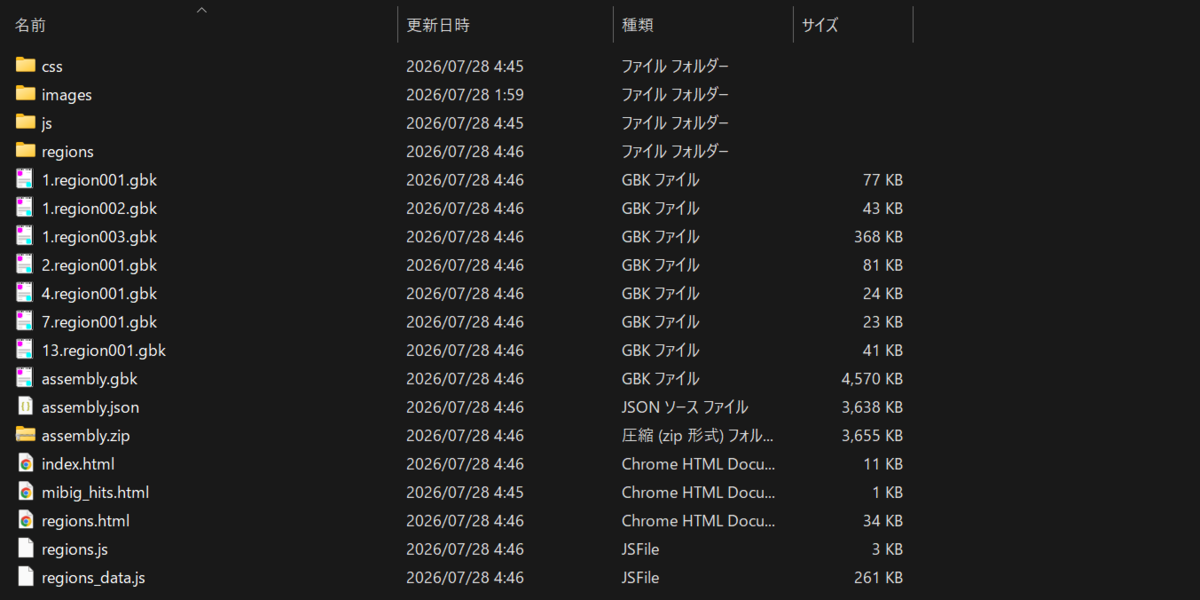
出力は基本的にAntismashと同じ構成となる。
index.html

regions.html
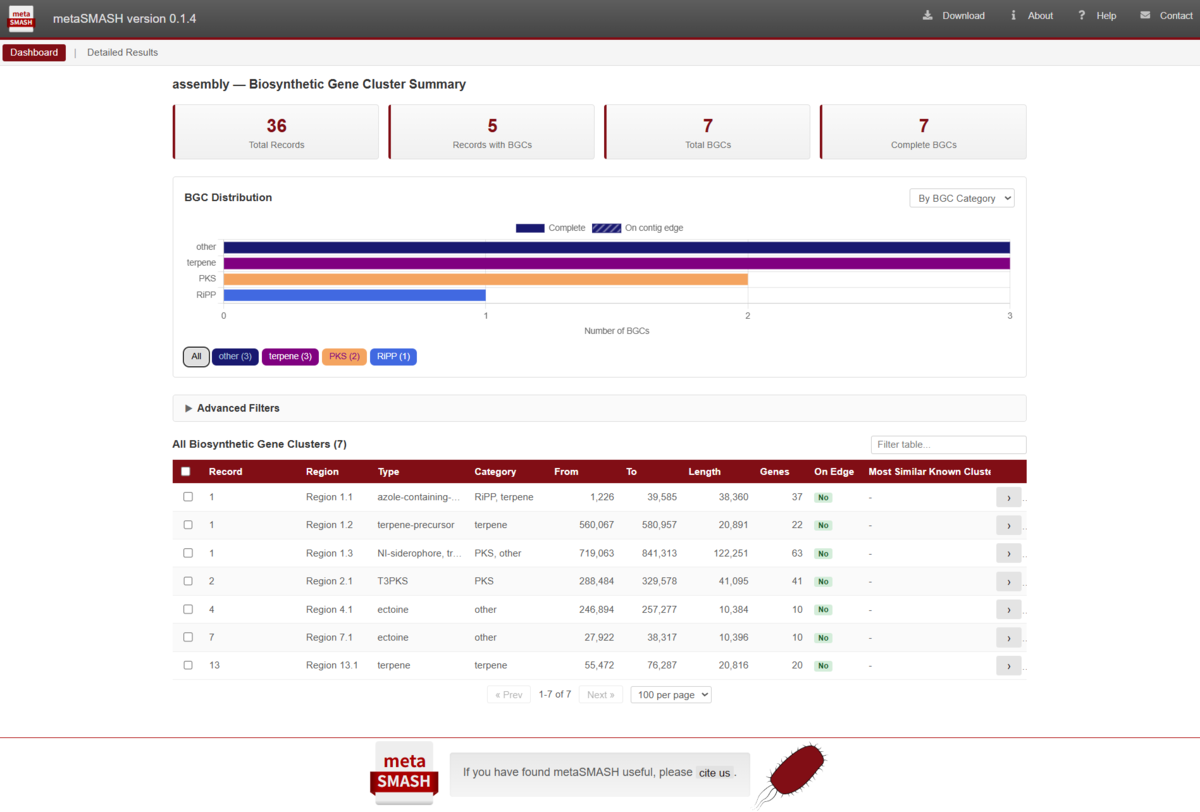
入力に10件を超えるレコードが含まれている場合、レコードをすべてメモリに読み込むのではなく、1件ずつのStreaming処理(検出とそれに続く分析の2段階)が自動的に有効になる(--streaming auto)。これは強制ON/OFFもできる
#ON
metasmash --streaming on input.fasta

#OFF
metasmash --streaming off input.fasta
- --streaming auto|on|off
OFFにするとメモリ使用量が増大する可能性があるので注意。
各contigの分類情報をレポートに表示するには、コンティグそれぞれの分類群アサイン結果のtaxonomy.tsvファイルを提供する。
metasmash --genefinding-tool prodigal-m -c 32 --workers 8 --output-dir outdir --html-taxonomy taxonomy.tsv input.fasta
- --streaming auto|on|off
コンティグ名と分類の2列が必要。

taxonomy.tsvを提供するとレポートに分類情報の列が追加される。

その他、論文より
- 大きなメタゲノムアセンブリではstreamingが自動で有効になる
- メモリ使用量を抑えたい時は--workersを小さめにする
- antiSMASHを大規模なメタゲノムアセンブリに適用するには、現在のアーキテクチャでは大きな制約があった。標準的なantiSMASHパイプラインは、すべての入力シーケンスをメモリにロードし、それらを内部データモデルに変換した後、すべてのレコードを同時に保持しながら、検出および解析フェーズで処理するが、大規模なメタゲノムアセンブリでは、データセット全体をメモリにロードすると数百ギガバイトを超えるメモリ容量が必要になる場合があった。さらに、下流解析におけるレコードの逐次的な反復処理は、データセットのサイズに対して実行時間が著しく低下し、大規模なアセンブリでは数日から数週間かかることも珍しくなかった。そのため、ユーザーは、入力をより小さなチャンクに分割したり、複数の並列インスタンスを実行したり、後で出力をマージするためのカスタムスクリプトを作成したりといった、場当たり的な回避策に頼らざるを得なかった。
- metaSMASHは、antiSMASHのロジックを踏襲して同等のBGC(生合成遺伝子クラスター)予測結果を生成しつつ、大規模かつ断片化されたアセンブリに適した、ストリーミング処理およびメモリ使用量を制限するアーキテクチャに基づく並列実行フレームワークを導入した。さらに、metaSMASHは、逐次的な出力書き出し、Copy-on-Write(書き込み時コピー)方式によるデータベース共有、任意の出力フィルタリング、分類情報を考慮した結果の探索機能、そして大規模メタゲノムデータセット向けの対話型HTMLダッシュボードといった機能を提供する。
- 重要な点として、metaSMASHはantiSMASHの代替として配布されるため、既存のデータベースや、遺伝子クラスターファミリー解析 [16] を含む後続のワークフローとシームレスに統合できる。
- ベンチマークでは、標準的なantiSMASHの設定と比較してmetaSMASHは幾何平均で38倍高速。小さなチャンクに分割して並列化したantiSMASHと比較してもmetaSMASHは幾何平均で2.9倍高速に、メモリは1.7倍削減された。さらに巨大なデータセットでのベンチマークは、チャンクに分割して並列化したantiSMASHはメモリ不足になった一方で、metaSMASHは完遂した (AMD EPYC 7543 x2、450 GB RAMサーバー)
引用
metaSMASH: Scalable Biosynthetic Gene Cluster Detection for Large Metagenomic Assemblies
Caner Bagci, Kai Blin, Nadine Ziemert
bioRxiv, Posted July 25, 2026.
関連
