ハイスループットシーケンシングデータの品質管理(quality control: QC)は、ゲノム解析パイプラインにおける重要な最初のステップである。FastQCは10年以上にわたり、シーケンシングQCの事実上の標準ツールとして利用されてきたが、Javaランタイムへの依存により、起動時のオーバーヘッド、メモリ消費量の増大、および導入の複雑化という問題がある。一方、Oxford Nanopore Technologies(ONT)およびPacific Biosciences(PacBio)のロングリードシーケンシングプラットフォームの普及に伴い、ショートリードとロングリードの双方を扱うことのできるQCツールに対する需要が急速に高まっている。しかし、既存の手法ではデータタイプごとに別々のツールが必要であり、さらに複数サンプルの結果を統合するためにMultiQCなどの追加の集約ツールが必要である。
本研究では、Rustで記述された統合型シーケンシングQCツールであるRastQCを開発した。RastQCは、FastQC互換のショートリードQC、ロングリード特異的な指標、複数サンプルのサマリー機能、MultiQC用JSONのネイティブ出力、およびWebベースのレポートビューアを、単一の2.1 MBのスタティックバイナリに統合したツールである。RastQCは、FastQCの標準12モジュールすべてを同等のアルゴリズムで実装しているほか、ロングリード向けに3つのモジュール、すなわちRead Length N50、Quality Stratified Length、およびHomopolymer Contentを追加している。5種類のモデル生物を用いた55件中55件の判定において、FastQCとのモジュールレベルでの一致率100%を達成した。
RastQCは、適応的なバッチサイズ調整を備えたストリーミング並列パイプラインにより、Illuminaショートリードデータでは1.8~3.2倍、ONT/PacBioロングリードデータでは4.7~6.5倍の高速化を達成した。また、小規模ファイルではメモリ使用量を8~9分の1に削減し、大規模ファイルではFastQCと同程度のメモリ使用量であった。RastQCはMITライセンスのもとで無償公開されており、AIエージェント向けスキルとしても https://github.com/Huang-lab/RastQC から利用可能である。
インストール
Gihtub
#ショートリード
mamba create -n RastQC -y
conda activate RastQC
mamba install -c bioconda rastqc -y
#Nanopore
mamba install -c bioconda rastqc-nanopore -y

#ソースコードからビルドする。
#Github
git clone https://github.com/Huang-lab/RastQC.git
cd RastQC
cargo build --release
#Nanopore 形式のサポートを有効にしてビルドする場合は、次のオプションを付ける。
cargo build --release --features nanopore
> rastqc
Error: No input files specified. Pass file paths or use --stdin to read from standard input.
(RastQC) kazu@kazunoMacBook-Air ~ % rastqc -h
RastQC - A quality control tool for high throughput sequence data
Usage: rastqc [OPTIONS] [FILES]...
Arguments:
[FILES]... Input files (FASTQ, BAM, SAM). Use "-" to read FASTQ from stdin
Options:
--stdin Read FASTQ from stdin (equivalent to passing "-" as input)
-o, --outdir <OUTDIR> Output directory
-t, --threads <THREADS> Number of threads [default: 10]
-c, --contaminants <CONTAMINANTS> Custom contaminant file
-a, --adapters <ADAPTERS> Custom adapter file
-l, --limits <LIMITS> Custom limits file
-k, --kmer-size <KMER_SIZE> Kmer size (default 7) [default: 7]
--nofilter Don't filter low quality reads
--extract Extract ZIP archive after creation
--nozip Don't create ZIP, only HTML
--summary Write multi-file summary report (summary.html + summary.tsv)
-q, --quiet Quiet mode - suppress progress
--dup-length <DUP_LENGTH> Length to truncate sequences for duplication detection [default: 50]
--multiqc-json Output native MultiQC JSON (multiqc_fastqc.json) alongside standard reports
--exit-code Return QC-aware exit codes: 0=all pass, 1=warnings, 2=failures. Useful for automated QC gates in Nextflow, Snakemake, etc
--serve Start a local web server to browse reports (default port: 8080)
--port <PORT> Port for the web server (used with --serve) [default: 8080]
--no-parallel Disable intra-file parallelism (streaming parallel is on by default for files >50MB)
--time Show per-file and per-step timing breakdown
--long-read Enable long-read QC modules (Read Length N50, Quality Stratified Length, Homopolymer Content). Auto-enabled for Fast5/POD5 inputs
-h, --help Print help
-V, --version Print version
> rastqc-nanopore -h
RastQC - A quality control tool for high throughput sequence data
Usage: rastqc-nanopore [OPTIONS] [FILES]...
Arguments:
[FILES]... Input files (FASTQ, BAM, SAM). Use "-" to read FASTQ from stdin
Options:
--stdin Read FASTQ from stdin (equivalent to passing "-" as input)
-o, --outdir <OUTDIR> Output directory
-t, --threads <THREADS> Number of threads [default: 10]
-c, --contaminants <CONTAMINANTS> Custom contaminant file
-a, --adapters <ADAPTERS> Custom adapter file
-l, --limits <LIMITS> Custom limits file
-k, --kmer-size <KMER_SIZE> Kmer size (default 7) [default: 7]
--nofilter Don't filter low quality reads
--extract Extract ZIP archive after creation
--nozip Don't create ZIP, only HTML
--summary Write multi-file summary report (summary.html + summary.tsv)
-q, --quiet Quiet mode - suppress progress
--dup-length <DUP_LENGTH> Length to truncate sequences for duplication detection [default: 50]
--multiqc-json Output native MultiQC JSON (multiqc_fastqc.json) alongside standard reports
--exit-code Return QC-aware exit codes: 0=all pass, 1=warnings, 2=failures. Useful for automated QC gates in Nextflow, Snakemake, etc
--serve Start a local web server to browse reports (default port: 8080)
--port <PORT> Port for the web server (used with --serve) [default: 8080]
--no-parallel Disable intra-file parallelism (streaming parallel is on by default for files >50MB)
--time Show per-file and per-step timing breakdown
--long-read Enable long-read QC modules (Read Length N50, Quality Stratified Length, Homopolymer Content). Auto-enabled for Fast5/POD5 inputs
-h, --help Print help
-V, --version Print version
実行方法
RastQCはfastQCのようなリードQCを行うツール。ショートリードはrastqc、NanoporeのFast5/POD5 を扱う場合はrastqc-nanoporeを使用する。クリーニングしたfastqを出力するものではないので注意する。
FASTQ ファイルを指定する。レポートの出力先は-oで指定する。8スレッド指定。
#paired-end
rastqc -t 8 -o results/ sample_R1.fastq.gz sample_R2.fastq.gz
出力例

sample1_R1_fastqc.html
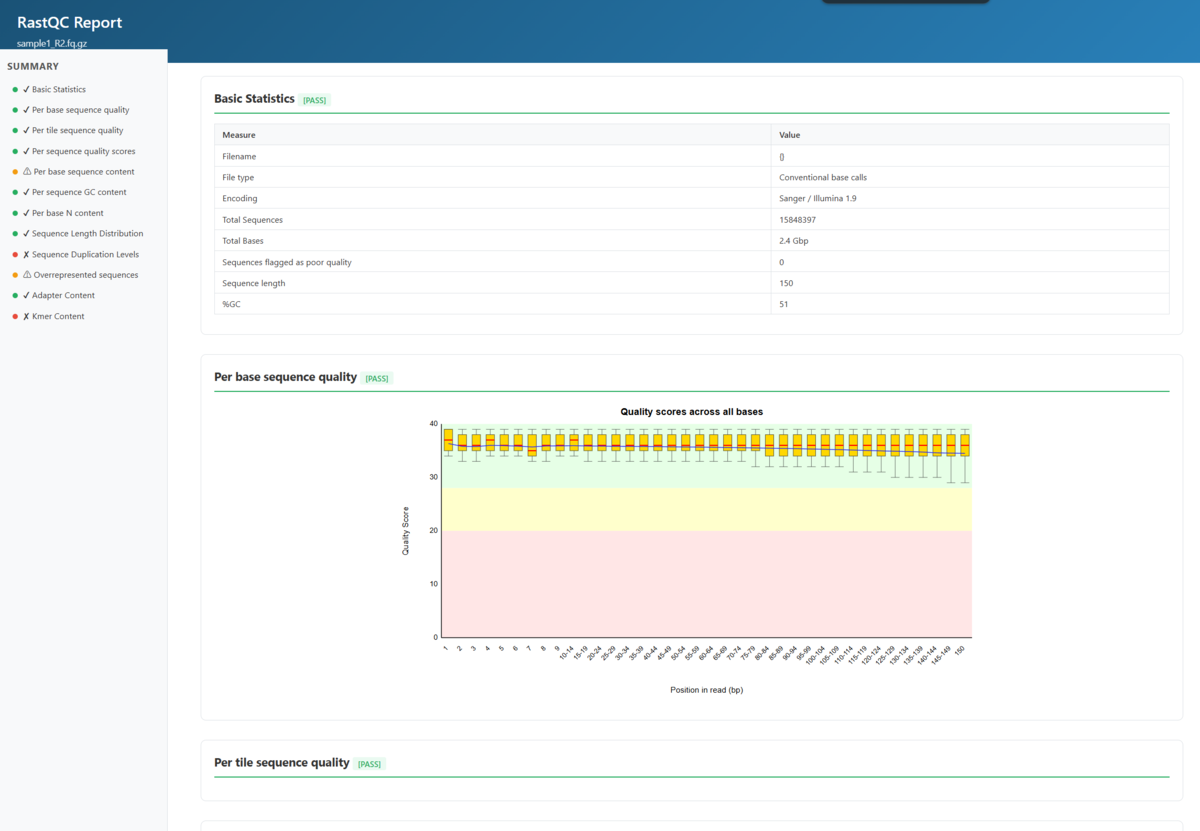
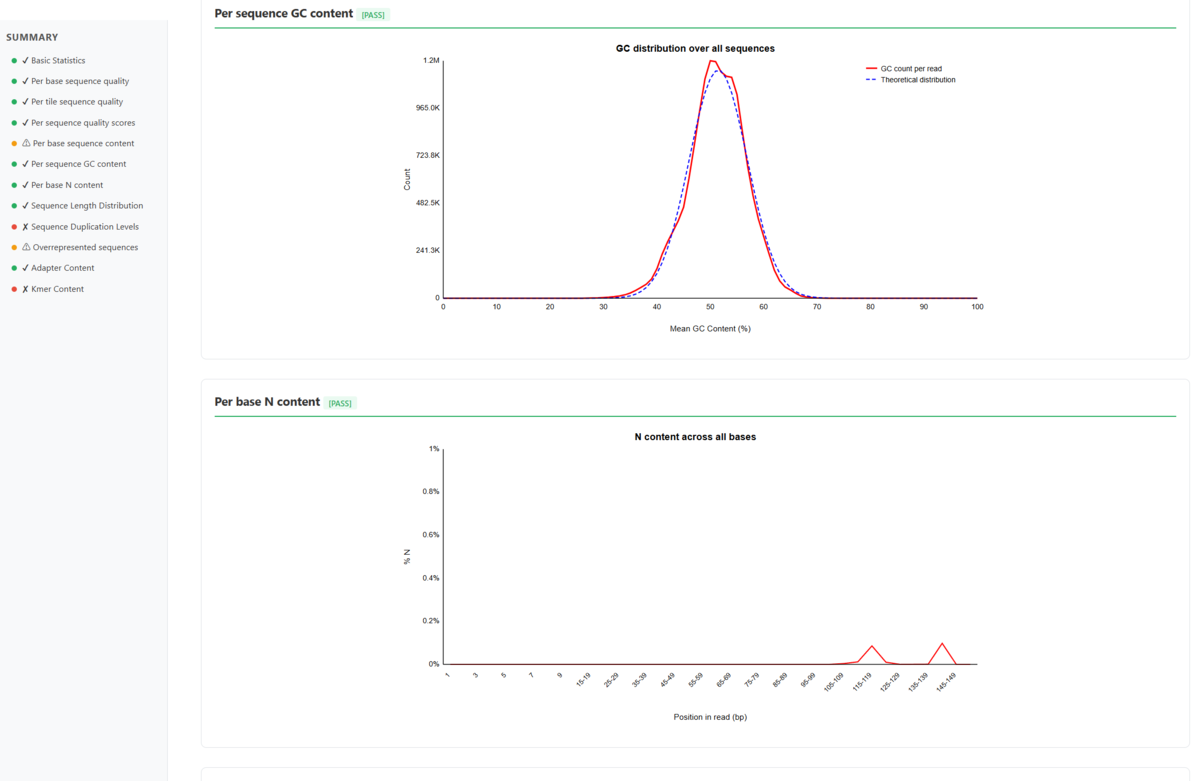
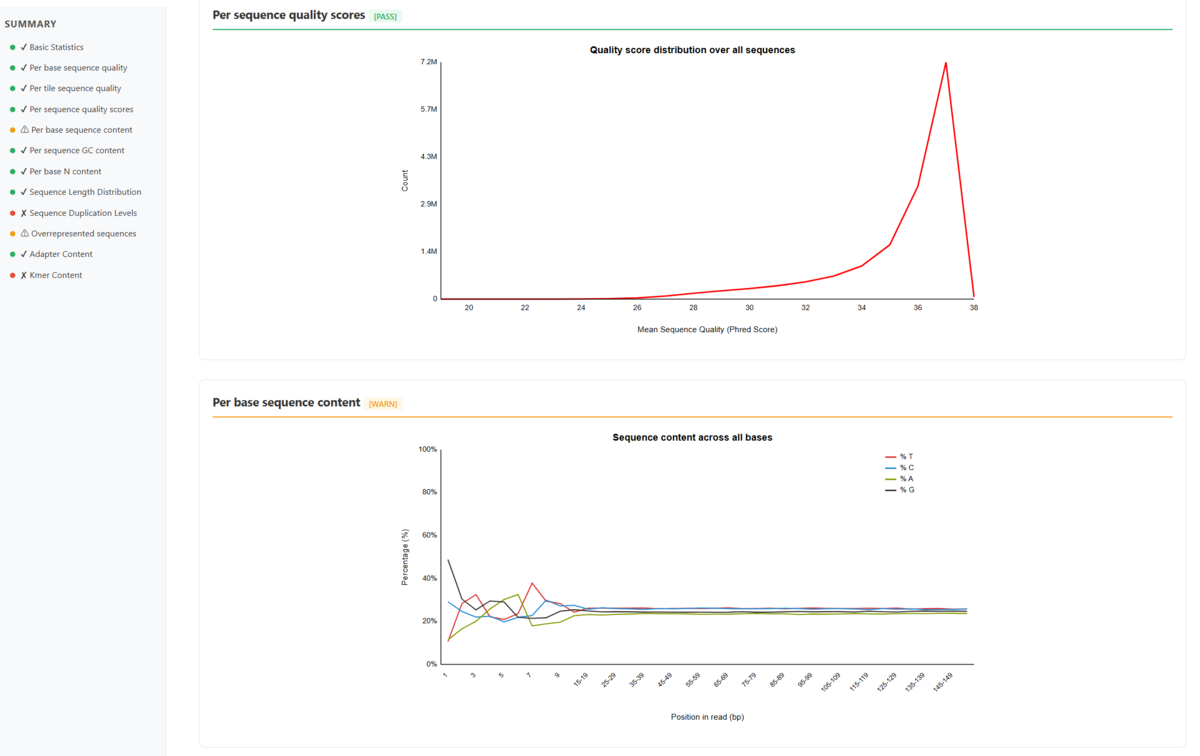
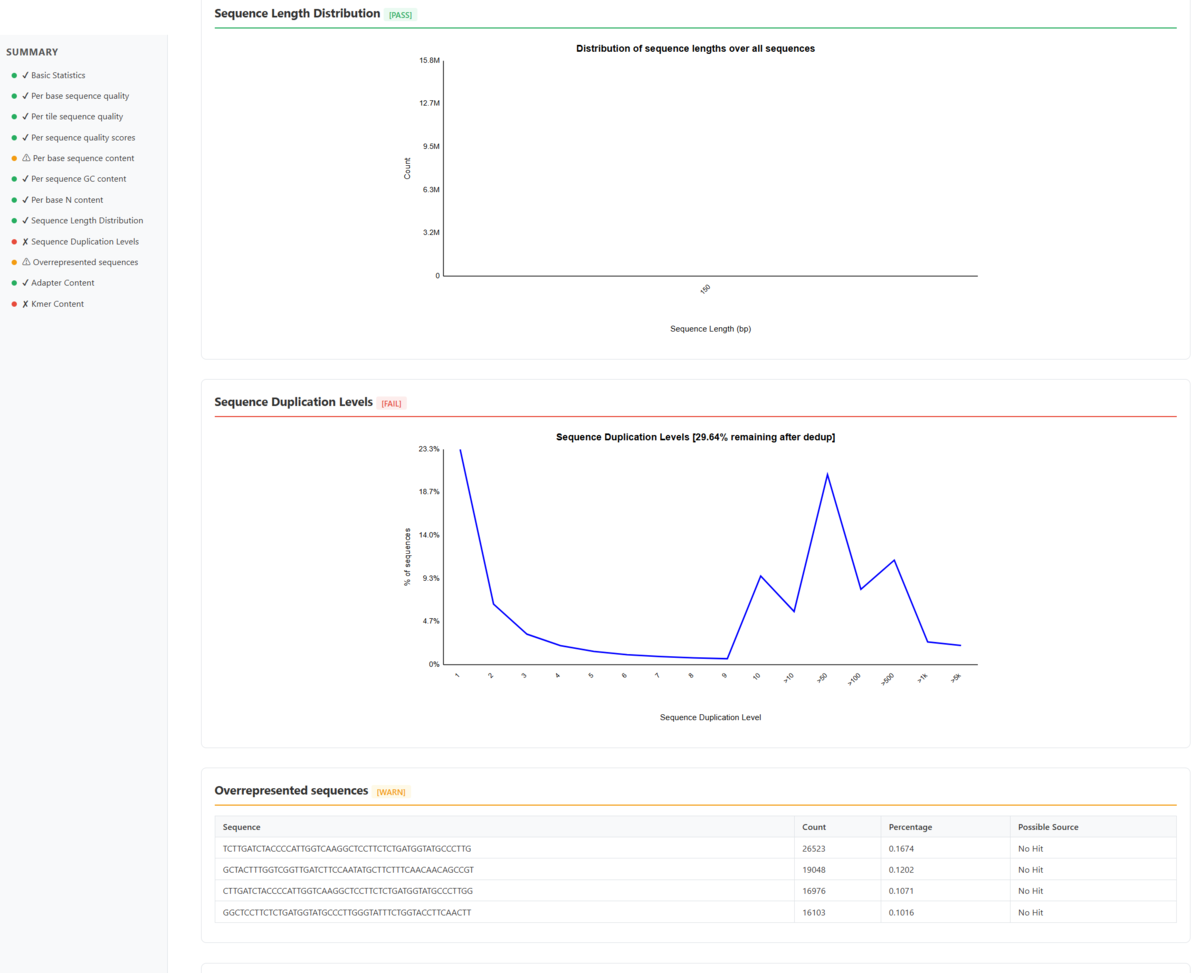
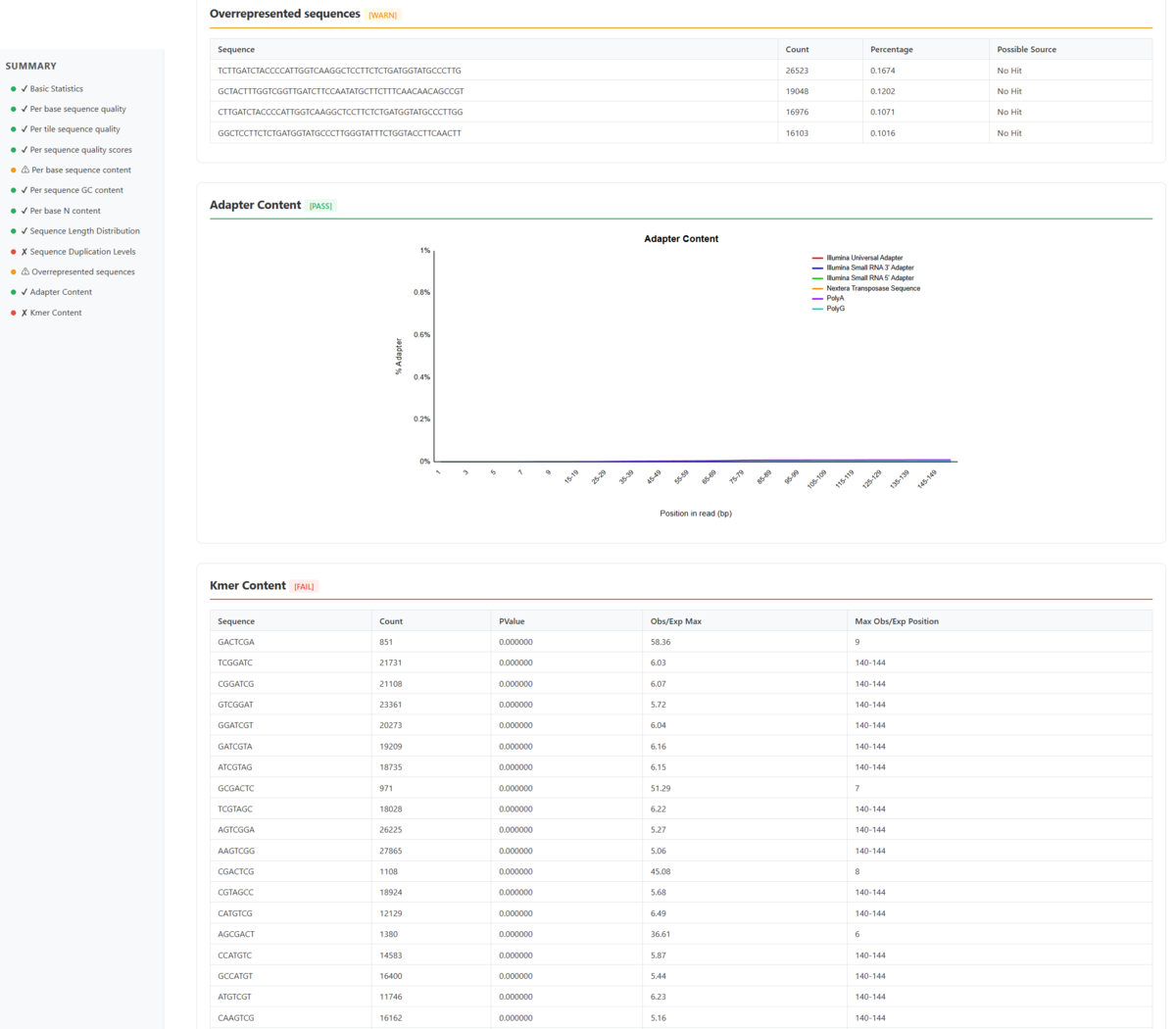
HTMLレポートだけを出力する。
#single
rastqc --nozip -o results/ sample.fastq.gz
標準入力にも対応している。
samtools fastq aligned.bam | rastqc --stdin -o results/
複数ファイルをまとめて確認する場合は--summaryを付ける。
rastqc --summary -o qc_results/ data/*.fastq.gz
--multiqc-jsonを指定すると、MultiQCで利用できるJSONも出力される。
rastqc --multiqc-json -o results/ sample.fastq.gz
パイプラインの品質管理に場合は--exit-codeを指定する。QC結果に応じて、0(PASS)、1(WARN)、2(FAIL)の終了コードを返す。
rastqc --exit-code sample.fastq.gz || echo "QC failed"
その他
-
標準ではショートリード向けの12モジュールが有効で、ロングリード向けの3モジュールは
--long-readで有効にする。ロングリード用の判定基準は Illumina のショートリードにそのまま適用するものではないため、データ形式に応じて使い分ける必要がある。 -
作者自身によるベンチマーク評価が公開されている。
- FastQCをRustで高速化しただけではなく、FastQC + MultiQC + long-read QCをまとめて扱いやすくしている。
- SKILL.mdが公開されている(URL)。AI agentに普通にGithubリンクを渡すだけでも理解するが、SKILL.mdを提供することで、毎回確実に同じやり方で実行するようにできる(繰り返し使うワークフローなど)
引用
RastQC: High-Performance Sequencing Quality Control Written in Rust
Kuan-Lin Huang
bioRxiv, Posted April 06, 2026.
関連
注:RustQCは別のツール。
