2026/04/30 更新
多重配列アライメントは、タンパク質の構造と機能の予測から系統樹の推論まで、多くのバイオインフォマティクスおよび計算生物学解析において重要なステップである。しかし、大きく異なる配列アライメントには、しばしばかなりの量のノイズが含まれている。ノイズの低減は通常、アライメントをフィルタリングして、アライメントが不十分な列や有用な情報がほとんどない列を除去することによって行われる。これは、さまざまなソフトウェアツールを使用して自動的に行うか、手動で検査することによって行われる。手動によるアプローチは労力がかかり再現性は低いが、各アライメントに適切でない可能性のあるフィルタリング基準に頼るのではなく、研究者の専門知識を活用できる。AliFilterは、機械学習を使用して手動アライメントのフィルタリングを自動化することで、アライメントキュレーションへのこれら2つのアプローチを橋渡しする。AliFilterは、少数の手動で注釈付けされたアライメントからモデルを作成するために教師あり学習アプローチを使用し、次にこのモデルをさまざまなデータセットに適用して手動注釈を再現する。ユーザーは、デフォルトモデルを使用してプログラムを使用することも、個々のデータセットまたはフィルタリング基準に合わせてカスタマイズされたモデルを作成することもできる。AliFilterは、トレーニングデータの誤りに対して耐性があり、手動注釈の結果を正確に再現する(精度98%)。一般的な系統ゲノム解析ワークフローにおいて、AliFilterは実行時間を35%短縮し、テストした他のフィルタリングツールとは異なり、完全なアライメントとほぼ同一の結果を生成した。AliFilterは無料のオープンソースソフトウェアであり、C#で記述され、GPLv3ライセンスの下でhttps://github.com/arklumpus/AliFilterから配布されている。
インストール
Github
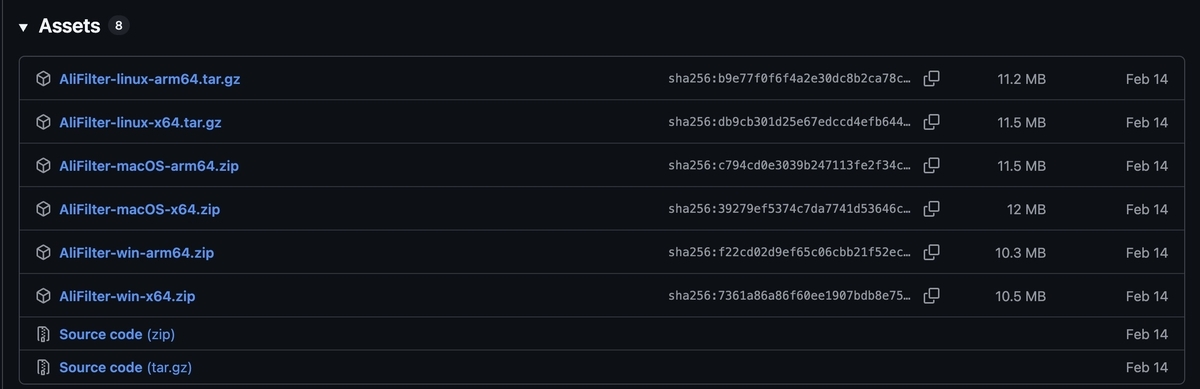
リリースからダウンロードする。ここではmacOS-arm64を選択 (M4 macbook air使用)
https://github.com/arklumpus/AliFilter/releases/tag/v1.0.1
> ./AliFilter -h
AliFilter version 1.0.1
Usage:
AliFilter {-h|--help}
Show the help message.
AliFilter [-i <input alignment>] [-o <output file>] [-m <input model file>]
[-t <alignment type>] [--input-format <format>] [-k <kind>]
[--output-format <format>] [--report <report file>] [-d <settings>]
[--clean[=gap threshold]] [--remove {sequence name|list file}]
[--keep <list file>] [--threshold <value>]
[--bootstrap-threshold <value>] [--bootstrap-replicates <value>]
[-p <max threads>] [-q]
Use a trained model to filter an alignment.
AliFilter --compare <alignment 1> <alignment 2> [-p <max threads>] [-k mask]
[-q]
Compare two alignments.
AliFilter -i <input alignment> --compare <mask 1> <mask 2> [-p <max threads>]
[-q]
Compare two alignment masks.
AliFilter -b <operation> <mask 1> [<mask 2> [<mask 3> ...]]
[-q]
Apply a bitwise operation to the alignment mask(s).
AliFilter --suggest <alignment folder> [--count <number>]
[--split <training:validation:test>] [-t <alignment type>]
[--training-out <training list file>]
[--validation-out <validation list file>]
[--test-out <test list file>] [--input format <format>] [-q]
Suggest alignments that should be used for training, validation, and test.
AliFilter [-i <input alignment>] --mask <input mask> -o <output feature file>
[-v] [-t <alignment type>] [--input format <format>] [-a]
[--remove {sequence name|list file}] [--keep <list file>]
[-p <max threads>] [-q]
Compute alignment features.
AliFilter -f <input feature file> -o <output model file>
[--mistakes <proportion>] [-p <max threads>] [-q]
Train a model using pre-computed alignment features.
AliFilter -m <input model file> -f <input feature file>
-o <output validated model file> [--report <report file>]
[--target <target metric>] [--mistakes <proportion>]
[-p <max threads>] [-q]
Validate a pre-trained model using pre-computed alignment features.
AliFilter -m <input model file> -f <input feature file>
[--report <report file>] [-d <settings>] [--threshold <value>]
[--bootstrap-threshold <value>] [--bootstrap-replicates <value>]
[--mistakes <proportion>] [-p <max threads>] [-q]
Test a pre-trained model using pre-computed alignment features.
AliFilter -m <input model file> [-i <input alignment>] --mask <input mask>
[--report <report file>] [-d <settings>] [--threshold <value>]
[--bootstrap-threshold <value>] [--bootstrap-replicates <value>]
[-p <max threads>] [-q]
Test a pre-trained model using alignment features computed from the.
specified alignment and alignment mask.
Options:
In the list below, options that apply to specific tasks are tagged as follows:
* [F]: Alignment filtering.
* [=]: Alignment comparison.
* [*]: Mask comparison.
* [B]: Bitwise operations.
* [C]: Computing features.
* [M]: Model training.
* [V]: Model validation.
* [T]: Model testing.
* [S]: Training set suggestion.
-h, --help Print this message and exit.
-i, --input=VALUE [FC*] Input alignment file, or "stdin" to read to
the standard input).
-t, --type=VALUE [FC=*S] Input alignment type. Possible values are "
dna", "protein", or "auto" (the default).
--input-format=VALUE [FC=*S] Input alignment format. Possible values
are "fasta", "phylip", or "auto" (the default).
--remove=VALUE [FC=*] After reading the alignment, remove the
specified sequence(s) before any further
processing. This can either be the name of a
single sequence to remove, or the path to a file
containing the names of multiple sequences. If
multiple sequence names are provided, no error
occurs if some of them are not present in the
alignment.
--keep=VALUE [FC=*] After reading the alignment and before any
further processing, keep only the sequences
whose name is present in the specified file. No
error occurs if the file contains sequence names
that are not present in the alignment.
--mask=VALUE [C] Input alignment mask. This can either be the
name of a sequence in the input alignment, which
should contain only 0s and 1s, or the path to a
filtered version of the input alignment.
--compare=VALUE1,VALUE2
[=*] If -i|--input is specified, this argument
instructs the program to compare two alignment
masks, determining for how many columns they
agree or disagree. If -i|--input is not
specified, this argument instructs the program
to compare two alignments, determining how many
columns are present in both of them or only in
one.
-b, --bitwise=VALUE [B] Apply a bitwise operation to the supplied
alignment mask(s). The value of this argument
should be either the name of a bitwise operation
or a truth table. This argument should be
followed by a one or more mask files, each
containing the same number of 0s or 1s
representing columns to preserve or discard.
These masks(s) are combined using the specified
operation. Supported bitwise operations are "and"
, "or", "nor", "xor", "nand", "xnor" (any number
of masks), and "not" (only 1 mask). Other
operations can be applied by supplying a binary
truth table string of length 2^n, where n is the
number of masks and entries are sorted by their
bitwise representation. For example, the "xor"
operation on two masks corresponds to truth
table "0110".
-f, --features=VALUE [MVT] Input file containing alignment features,
used to train or validate models.
--mistakes=VALUE [MVT] Proportion of column assignments that should
be randomly changed. This is useful e.g., to
simulate human error in the training dataset.
Default: 0.
-m, --model=VALUE [FVT] Input file containing a trained (and
possibly validated) model. When filtering an
alignment, this can also be a path to a file
containing a sequence of 0 and 1 representing a
pre-computed filtering mask. When filtering an
alignment, the default value is "alifilter",
which specifies the default model included with
the program.
-o, --output=VALUE [FCMV] Output file for the alignment, features, or
model.
-k, --output-kind=VALUE [F=] Kind of output file produced when filtering
an alignment. Possible values are "alignment" (
the default, a filtered alignment), "mask" (a
mask string of 0s and 1s), "fuzzy" (a mask
sequence with preservation scores encoded
following the Sanger convention for quality
values), or "float" (a sequence of floating
point numbers representing the preservation
scores, separated by spaces). If the value "mask"
is provided when comparing two alignments, a
mask string will be produced instead of counting
the number of columns in common to the two
alignments.
--output-format=VALUE [F] Output alignment format. Possible values are "
fasta", "phylip", or "auto" (the default - i.e.,
same as input).
--clean[=VALUE] [F] If this argument is specified, after the
filtering has been performed, sequences that
contain more than the specified proportion of
gaps are removed. If no value is specified,
sequences that contain 100% gaps are removed.
Default: no sequences are removed.
--report=VALUE [FVT] Output path for a report file which will
contain information about the model or the
alignment. If this has ".md" extension, the
report will be saved in Markdown format;
otherwise, it will be saved in PDF format (which
is probably what you want).
-a, --append [C] When exporting alignment features, append them
to the output file rather than overwriting it.
This can be useful to include multiple
alignments in the same model. Default: no.
-v, --validation [C] When computing features, signals that the
features will be used for model validation or
testing, hence bootstrap replicates should be
computed as well. Default: no.
--threshold=VALUE [FT] Logistic model score threshold for keeping
alignment columns. Default: 0.5, or as specified
by model validation. Range: 0 - 1.
--bootstrap-threshold=VALUE
[FT] Bootstrap replicate threshold for keeping
alignment columns. Default: 0.5, or as specified
by model validation. Range: 0 - 1.
--bootstrap-replicates=VALUE
[FT] Number of bootstrap replicates to compute.
Default: 0, or as specified by model validation.
Range: >= 0.
--target=VALUE [V] Target measure to optimise during model
validation. Possible values are "MCC" (Matthews
correlation coefficient, the default), "accuracy"
, or "F_<beta>" (F score, where "<beta>" > 0 is
a parameter that determines the balance between
false positives and false negatives; e.g. "F_1"
or "F_0.5").
-d, --default=VALUE [FT] Which default settings to apply when using or
testing a validated model. Possible values are "
fast" (no bootstrap replicates), "accurate" (
parameters resulting in the best validation
score, regardless of computational effort), or "
best" (the default, which provides the best
balance between computational effort and
accuracy).
--suggest=VALUE [S] Folder containing unfiltered alignments that
may be used to train a model. When this argument
is specified, the program suggests which
alignments should be manually filtered and used
as training, validation, and test sets.
--count=VALUE [S] Number of alignments that may be used to train
a model. This should be set to the maximum
number of alignments that you are willing to
manually (or otherwise) filter in order to build
training, validation, and test sets. Default: 40.
--split=VALUE [S] Ratio between the sizes of the training,
validation, and test sets that should be
suggested. Default: 2:1:1.
--training-out=VALUE [S] Output file for the suggested training set. If
this is not specified, the training set is
printed to the standard output.
--validation-out=VALUE [S] Output file for the suggested validation set.
If this is not specified, the validation set is
printed to the standard output.
--test-out=VALUE [S] Output file for the suggested test set. If
this is not specified, the test set is printed
to the standard output.
-p, --max-threads=VALUE Maximum degree of parallelism for operations that
support parallelisation. Default: autodetect
based on the system.
-q, --quiet Quiet mode (do not write anything to the standard
error, except for unrecoverable errors).
実行方法
使用するにはFASTA形式またはrelaxed PHYLIP形式の多重配列アラインメントファイルが必要。
デフォルトの事前学習済みモデルで実行 *1
AliFilter -i alignment.fas -o output.fas
output.fas がフィルタリング済みアラインメント。保持すべき列だけが残る。
カスタムモデルを指定
AliFilter -i alignment.fas -o output.fas -m <model>
(トレーニングしなくてもデフォルトの事前学習済みモデルを自分のデータにも使えるが、自分の基準でフィルタリングしたい場合、トレーニングしてそのモデルを使うことができる。自分が目で見てここは残すか、捨てると判断する手動フィルタリングの基準をAliFilterの機械学習モデルで再現したい場合など)
mafftと組み合わせて多重配列アラインメントとフィルタリングを一度に実行
mafft --auto unaligned.fas | AliFilter > filtered.fas
そのほか(論文より)
- AliFilterは、手動アラインメントトリミングの判断を機械学習で再現するツール。
- 少数の手動フィルタリング済みデータからモデルを作ることもできる
- BMGE、trimAl、Gblocksはカラムを少なめに残す傾向があり、NoisyやClipKITは多めに残す傾向があった。AliFilterは、手動フィルタリングに近い割合でカラムを保持しており、ノイズ除去と情報保持のバランスがよい
- SILVAやGTDBの非常に大きなアラインメントを使ったベンチマークで、AliFilterは一貫して他ツールより高速だった。最大級のアラインメントでも10分未満で処理
- Cyanobacteriaの139遺伝子を使った系統解析では、AliFilterで処理したアラインメントは、未フィルタリングデータとほぼ同じ系統樹を出し、IQ-TREEでの実行時間は未フィルタリングより約 35%短縮された。他のツールは「似た系統樹」または「短い実行時間」のどちらかは達成できても、AliFilterのように両方を同時に満たせなかった。
- 手動フィルタリングには人為的ミスが入るが、AliFilterは訓練・検証データにランダムな誤りを混ぜても、誤りが50%近くになるまではAccuracyやMCCが大きく低下しなかった。実用上頑健
引用
AliFilter: a machine learning approach to alignment filtering Open Access
Giorgio Bianchini , Rui Zhu , Francesco Cicconardi , Edmund R R Moody
Molecular Biology and Evolution, Volume 43, Issue 4, April 2026
