大規模な細菌比較ゲノム解析には、ゲノムアセンブリとその生物学的コンテキストを記述する包括的なメタデータが必要である。NCBI Genomeにはアセンブリが、BioSampleには採取日、宿主、場所などの重要なコンテキストフィールドが保存されているが、統合されていないため、研究者は2つのソースを手動で統合する必要があり、大規模な比較研究の速度が低下している。このギャップに対処するため、NCBI GenomeとBioSampleのレコードから細菌ゲノムメタデータを自動的に取得、統合、分析、視覚化するPythonベースのツールであるFetchMを開発した。FetchMは、NCBI Entrez APIを介してゲノムアセンブリを対応するBioSampleエントリにリンクし、不足しているコンテキストフィールドを追加し、要約テーブルとプロットを生成する。このツールは、ユーザー定義の基準(年、宿主、国、大陸など)によるシーケンスフィルタリングをサポートし、下流のワークフローで分析可能なデータセットを生成する。
FetchMはNCBIから取得した14,382件のコレラ菌ゲノムアセンブリに適用され、BioSample関連メタデータの大規模な統合に成功した。時間メタデータは89.07%、地理メタデータは86.37%、宿主メタデータは40.92%のレコードで利用可能であり、公開されているコンテキストデータに依然としてギャップが存在することが明らかになった。ゲノムアセンブリのサイズとアノテーションの特徴は既知の生物学的予測と一致しており、取得ワークフローの正確性を裏付けている。選択されたレコードの手動検証では、主要なフィールドにおいてFetchMの出力とソースメタデータとの間に高い一致が見られた。これらの結果は、FetchMがゲノムメタデータとコンテキストメタデータの信頼性が高くスケーラブルな統合を可能にする一方で、公開リポジトリにおけるメタデータの完全性の限界も明らかにすることを示している。FetchMはMITライセンスの下で提供されており、https://github.com/Tasnimul-Arabi-Anik/FetchM およびPyPIから無料で入手できる。
インストール
mambaで環境を作ってテストした(M4 macbook air使用)。
Github
mamba create -n fetchm python=3.9 -y
conda activate fetchm
pip install fetchm

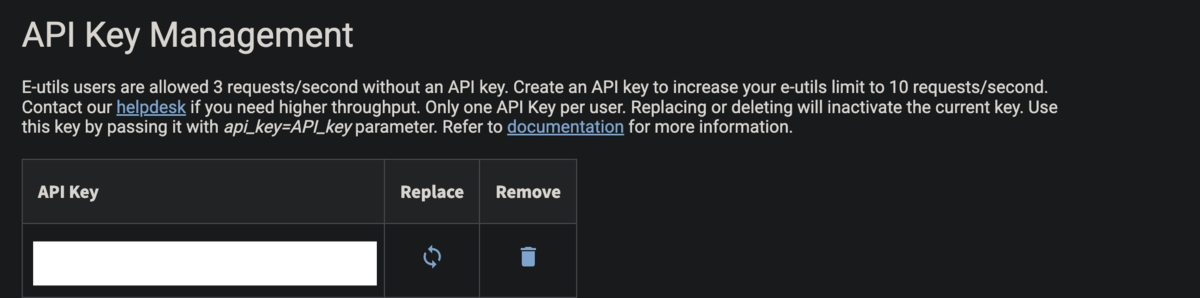
#NCBI API keyを使う場合は、環境変数に入れておく (*1 下で解説)
export NCBI_API_KEY=YOUR_NCBI_API_KEY
> fetchm -h
% fetchm -h
usage: fetchm [-h] {metadata,run,seq} ...
Unified metadata and sequence download CLI for fetchm.
positional arguments:
{metadata,run,seq}
metadata Fetch metadata and generate summaries from an NCBI dataset TSV.
run Run metadata generation and sequence download in one command.
seq Download genome FASTA files from ncbi_clean.csv.
optional arguments:
-h, --help show this help message and exit
> fetchm metadata -h
fetchm metadata -h
usage: fetchm metadata [-h] --input INPUT --outdir OUTDIR [--sleep SLEEP] [--api-key API_KEY] [--email EMAIL] [--workers WORKERS]
[--ani {OK,Inconclusive,Failed,all} [{OK,Inconclusive,Failed,all} ...]] [--checkm CHECKM] [--resume-metadata] [--seq] [--host HOST [HOST ...]]
[--year YEAR [YEAR ...]] [--country COUNTRY [COUNTRY ...]] [--cont CONT [CONT ...]] [--subcont SUBCONT [SUBCONT ...]] [--retries RETRIES]
[--retry-delay RETRY_DELAY] [--check-only] [--download-workers DOWNLOAD_WORKERS]
optional arguments:
-h, --help show this help message and exit
--input INPUT Path to the input TSV file
--outdir OUTDIR Path to the output directory
--sleep SLEEP Time to wait between NCBI requests. Default is 0.34s without an API key and 0.15s with an API key.
--api-key API_KEY NCBI API key. If omitted, fetchm will also look for NCBI_API_KEY in the environment.
--email EMAIL Contact email to send with NCBI E-utilities requests.
--workers WORKERS Number of concurrent metadata fetch workers. Default is 3 without an API key and 6 with an API key.
--ani {OK,Inconclusive,Failed,all} [{OK,Inconclusive,Failed,all} ...]
Filter genomes by ANI status. Choices: OK, Inconclusive, Failed, all. Default is all (no ANI filtering).
--checkm CHECKM Minimum CheckM completeness threshold. If not set, no CheckM filtering will be applied.
--resume-metadata Resume a previous metadata run from the existing ncbi_dataset_updated.tsv in the output directory. Only rows with unresolved metadata fetch status will be
retried.
--seq Run the script to download sequences
--host HOST [HOST ...]
Filter by host species, e.g. "Homo sapiens"
--year YEAR [YEAR ...]
Filter by year or year range, e.g. "2015" "2018-2025"
--country COUNTRY [COUNTRY ...]
Filter by country, e.g. "Bangladesh" "United States"
--cont CONT [CONT ...]
Filter by continent, e.g. "Asia" "Africa"
--subcont SUBCONT [SUBCONT ...]
Filter by subcontinent, e.g. "Southern Asia"
--retries RETRIES Retry attempts per genome download (default: 3)
--retry-delay RETRY_DELAY
Base delay in seconds before retrying a failed download (default: 5.0)
--check-only Only audit the output directory against the input CSV without downloading.
--download-workers DOWNLOAD_WORKERS
Concurrent genome download workers (default: 4)
> fetchm run -h
usage: fetchm run [-h] --input INPUT --outdir OUTDIR [--sleep SLEEP] [--api-key API_KEY] [--email EMAIL] [--workers WORKERS]
[--ani {OK,Inconclusive,Failed,all} [{OK,Inconclusive,Failed,all} ...]] [--checkm CHECKM] [--resume-metadata] [--seq] [--host HOST [HOST ...]] [--year YEAR [YEAR ...]]
[--country COUNTRY [COUNTRY ...]] [--cont CONT [CONT ...]] [--subcont SUBCONT [SUBCONT ...]] [--retries RETRIES] [--retry-delay RETRY_DELAY] [--check-only]
[--download-workers DOWNLOAD_WORKERS]
optional arguments:
-h, --help show this help message and exit
--input INPUT Path to the input TSV file
--outdir OUTDIR Path to the output directory
--sleep SLEEP Time to wait between NCBI requests. Default is 0.34s without an API key and 0.15s with an API key.
--api-key API_KEY NCBI API key. If omitted, fetchm will also look for NCBI_API_KEY in the environment.
--email EMAIL Contact email to send with NCBI E-utilities requests.
--workers WORKERS Number of concurrent metadata fetch workers. Default is 3 without an API key and 6 with an API key.
--ani {OK,Inconclusive,Failed,all} [{OK,Inconclusive,Failed,all} ...]
Filter genomes by ANI status. Choices: OK, Inconclusive, Failed, all. Default is all (no ANI filtering).
--checkm CHECKM Minimum CheckM completeness threshold. If not set, no CheckM filtering will be applied.
--resume-metadata Resume a previous metadata run from the existing ncbi_dataset_updated.tsv in the output directory. Only rows with unresolved metadata fetch status will be
retried.
--seq Run the script to download sequences
--host HOST [HOST ...]
Filter by host species, e.g. "Homo sapiens"
--year YEAR [YEAR ...]
Filter by year or year range, e.g. "2015" "2018-2025"
--country COUNTRY [COUNTRY ...]
Filter by country, e.g. "Bangladesh" "United States"
--cont CONT [CONT ...]
Filter by continent, e.g. "Asia" "Africa"
--subcont SUBCONT [SUBCONT ...]
Filter by subcontinent, e.g. "Southern Asia"
--retries RETRIES Retry attempts per genome download (default: 3)
--retry-delay RETRY_DELAY
Base delay in seconds before retrying a failed download (default: 5.0)
--check-only Only audit the output directory against the input CSV without downloading.
--download-workers DOWNLOAD_WORKERS
Concurrent genome download workers (default: 4)
> fetchm seq -h
usage: fetchm seq [-h] --input INPUT --outdir OUTDIR [--host HOST [HOST ...]] [--year YEAR [YEAR ...]] [--country COUNTRY [COUNTRY ...]] [--cont CONT [CONT ...]]
[--subcont SUBCONT [SUBCONT ...]] [--retries RETRIES] [--retry-delay RETRY_DELAY] [--check-only] [--download-workers DOWNLOAD_WORKERS]
optional arguments:
-h, --help show this help message and exit
--input INPUT Path to ncbi_clean.csv
--outdir OUTDIR Directory where FASTA files will be written
--host HOST [HOST ...]
Filter by host species, e.g. "Homo sapiens"
--year YEAR [YEAR ...]
Filter by year or year range, e.g. "2015" "2018-2025"
--country COUNTRY [COUNTRY ...]
Filter by country, e.g. "Bangladesh" "United States"
--cont CONT [CONT ...]
Filter by continent, e.g. "Asia" "Africa"
--subcont SUBCONT [SUBCONT ...]
Filter by subcontinent, e.g. "Southern Asia"
--retries RETRIES Retry attempts per genome download (default: 3)
--retry-delay RETRY_DELAY
Base delay in seconds before retrying a failed download (default: 5.0)
--check-only Only audit the output directory against the input CSV without downloading.
--download-workers DOWNLOAD_WORKERS
Concurrent genome download workers (default: 4)
テストラン
FetchMではNCBIから出力したncbi_dataset.tsvを指定する。特にAssembly BioSample Accession列が重要で、この列を使ってBioSample側のメタデータが取得される。
テストランとして、レポジトリにあるtest.tsvを使う (200行)。
https://github.com/Tasnimul-Arabi-Anik/FetchM/blob/main/test.tsv
fetchm runコマンドを実行する。サブコマンドの"run"は、一括でメタデータ取得、表のクリーニング、レポートの生成、それぞれの株のゲノム配列の取得まで一括で行う全実行コマンドとなっている。
git clone https://github.com/Tasnimul-Arabi-Anik/FetchM.git
fetchm run --input FetchM/test.tsv --outdir results/
-
--input Path to the input TSV file
-
--outdir Path to the output directory
メタデータが順番にfetchされていく。

出力
results/

metadata_output/には、BioSampleから取得・整理されたメタデータ、要約表、レポートが出力される。

annotation_summary.csv
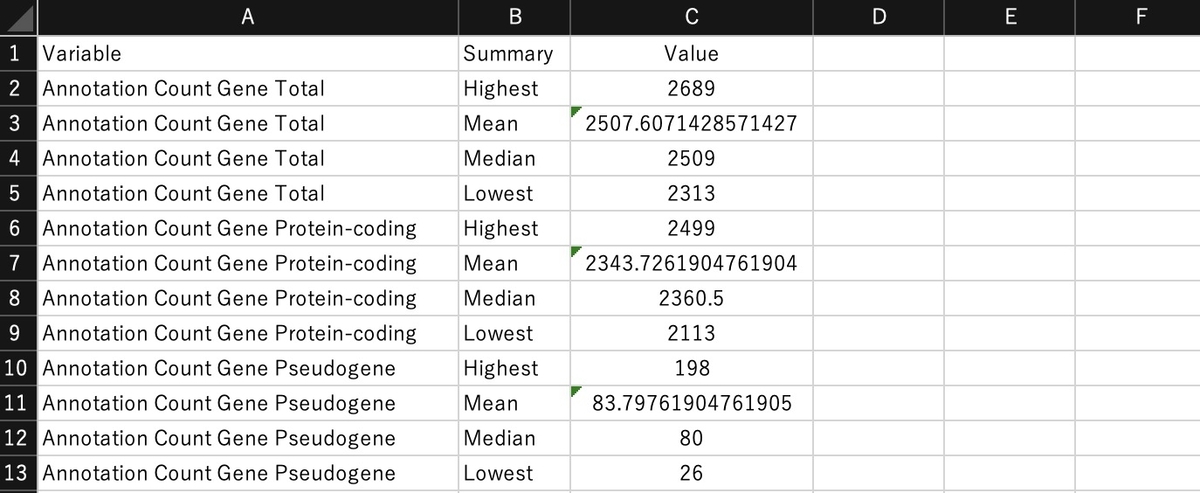
assembly_summary.tsv

metadata_harmonization_report.csv

metadata_summary.csv

ncbi_clean.csv

ncbi_dataset_updated.tsv - 入力として使った元のNCBI DatasetsテーブルにBioSample由来のメタデータを追加したTSV

fetchm_report.docx - word形式の詳細なレポートも生成される(markdownのfetchm_report.mdもできる)。

sequences/には、条件に合ったゲノムのfastaファイルが出力される。取得に失敗した配列はfailed_accessions.txtに記録される。sqlite3ファイルも含まれる。

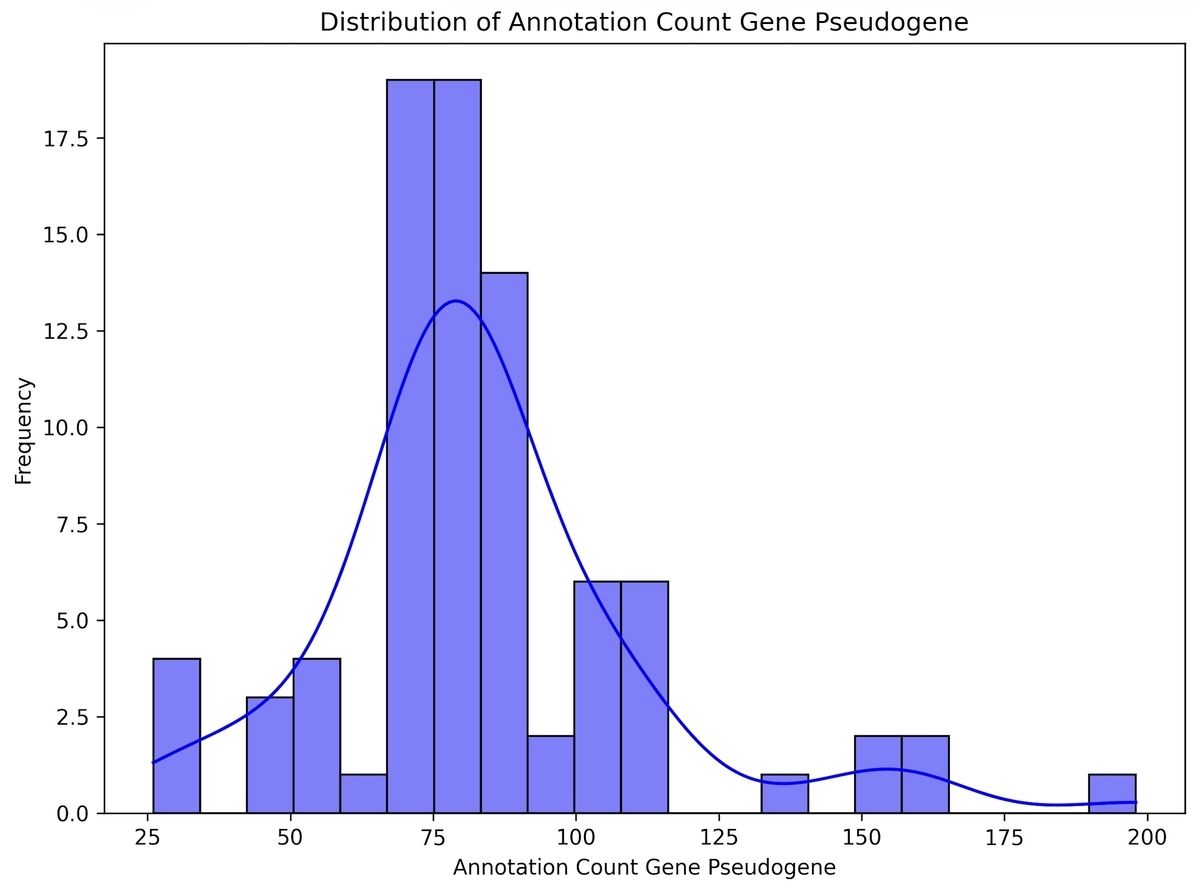
figures/には、メタデータやアセンブリ統計量を可視化した図が出力される。

Host_bar_plots.tiff

Geographic Location_map.jpg

Geographic Location_bar_plots.tiff

Continent_bar_plots.tiff

Collection Date_bar_plots.tiff
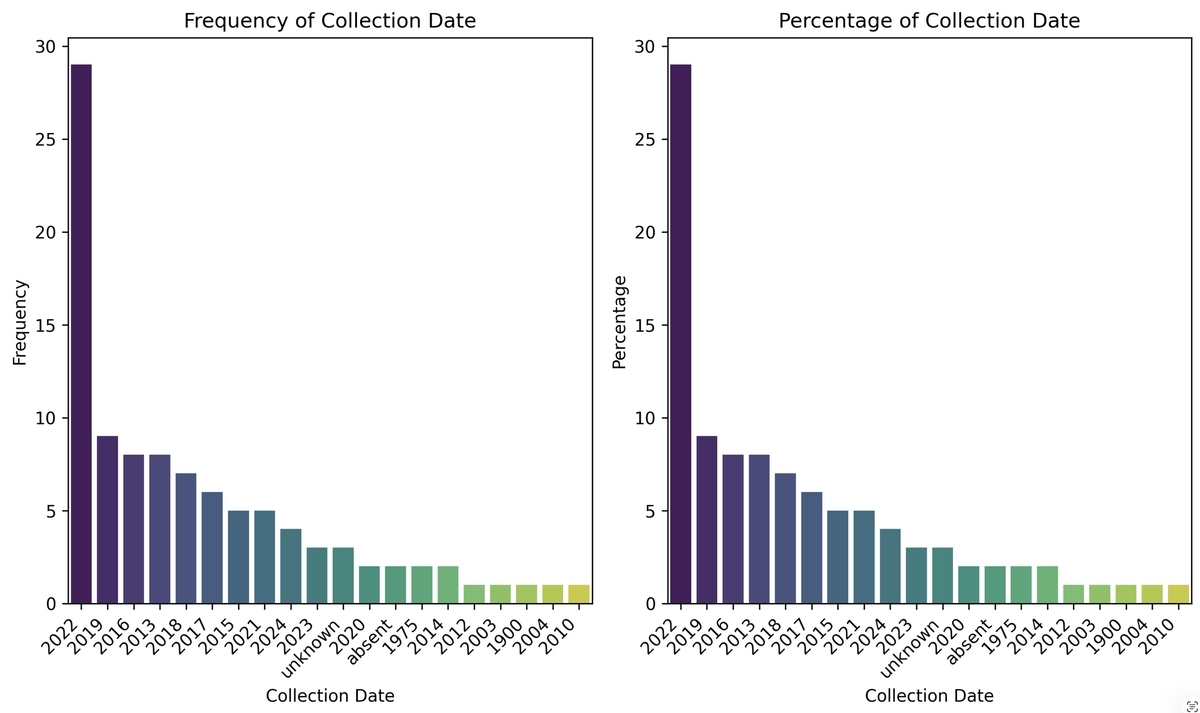
scatter_plot_total_sequence_length_vs_collection_date.tiff

Annotation Count Gene Protein-coding_distribution.tiff

Annotation Count Gene Pseudogene_distribution.tiff
作成中
引用
FetchM: Streamlining Genome and Metadata Integration for Bacterial Comparative Genomics
Tasnimul Arabi Anik , Peter Kjær Mackie Jensen , Anowara Begum
Bioinformatics Advances, Published: 04 May 2026
*1
NCBI API keyの取得
https://www.ncbi.nlm.nih.gov/datasets/docs/v2/api/api-keys/
1、ORCIDやグーグルアカウントなどを使ってNCBIのアカウントを作成後、NCBIでAccount settingsを選択(右上に表示されているメールアドレスより)

2、Account settingsのページに移動したら、下の方にAPI keyの項目がある。これを使う。