ゲノム特徴と形質の間、またはゲノム形質のペア間の関連性を識別する従来の方法は、細菌ゲノムに適用すると困難をきたす。細菌におけるゲノムワイド連鎖が強い進化誘導関連性を生み出すという事実を説明するために、いくつかの微生物GWAS(mGWAS)法が開発されているが、これらの方法は、偽発見率が高いか統計的検出力が不足しており、負の相互作用に対するパフォーマンスが低く、遺伝子間相互作用のパンゲノムワイド研究に必要な規模では計算上の限界に直面している。本稿では、効率的かつ厳密なmGWAS研究のための計算的に最適化されたフレームワーク、SimPhyNIを紹介する。SimPhyNIは、系統発生学的情報に基づくパラメータ(新たに最初のイベントまでの時間を含む)を使用して形質を独立にシミュレートすることにより、ヌル共起分布を構築する。これらのシミュレーションにおける制約された変動と、形質間の比較のための対数オッズ比スコアリングを組み合わせることで、正と負の両方の関連性をロバストに識別する。遺伝子間および遺伝子と形質の関連性を模倣した合成データセットを用いて、SimPhyNIが正の相互作用と負の相互作用の両方において高い適合率と再現率を達成することを実証した。大腸菌のファージ防御システム間の相互作用と、大腸菌パンゲノム全体(900万件以上のテスト)における遺伝子間相互作用を検出することで、SimPhyNIの有用性を実証した。本研究では2値形質向けに開発されたが、SimPhyNIの設計は、一般化された確率的シミュレーションモデルを用いることで、多状態形質や連続形質への拡張をサポートしている。SimPhyNIの性能とスケーラビリティは、微生物の機能、生態、そして疾患を駆動する遺伝子相互作用をゲノムワイドに発見することを可能にする。
SimPhyNIはhttps://github.com/jpeyemi/SimPhyNIで公開されており、関連するベンチマーク、検証、および生物学的解析用のコードはdoi.org/10.5061/dryad.9kd51c5xtで入手できる。本研究で使用した隣接結合系統樹とファージ防御システムのアノテーションは、Wu et al. (2024) から取得した。大腸菌ゲノムの代表的なセットと、それに対応する最尤系統樹は、PanXデータベース (https://pangenome.org/Escherichia_coli) からダウンロードした。
インパクトステートメント:細菌遺伝子が形質とどのように関連し、また互いにどのように関連しているかを理解することは、疾患の結果、抗生物質耐性、そして将来の進化を予測する上で不可欠である。しかし、共通の祖先が誤った相関関係を生み出すため、これらの相互作用を特定することは困難である。SimPhyNIは、祖先情報に基づく統計シミュレーションプロセスによってこの問題を克服し、大規模解析における計算効率を維持しながら、ほぼゼロの偽陽性率を実現する。この効率性により、数千の遺伝子とゲノムを含む大規模データセット全体にわたって、遺伝子間相互作用ネットワークを体系的にマッピングすることが可能になる。微生物ゲノムデータセットが拡大し続けるにつれて、SimPhyNI の拡張性と精度により、感染症、マイクロバイオーム機能、微生物の進化と生態の根底にあるメカニズム原理の発見が加速される。
SimPhyNIは以下を目的として設計されている:
- 形質の進化的パラメータ(獲得/喪失率、出現までの時間、祖先状態)を推定する
- 形質の独立シミュレーションを通じて形質共存のヌルモデルを推定する
- 関連性の統計的結果を出力する
インストール
mamba create -n simphyni -y
conda activate simphyni
mamba install -c conda-forge -c bioconda simphyni -y
> simphyni -h
usage: simphyni [-h] {version,download-examples,download-cluster-profile,run} ...
SimPhyNI — Simulation-based Phylogenetic iNteraction Inference.
positional arguments:
{version,download-examples,download-cluster-profile,run}
version Show SimPhyNI version
download-examples Download example input files from GitHub
download-cluster-profile
Download template cluster profile from GitHub
run Run SimPhyNI workflow
options:
-h, --help show this help message and exit
>simphyni version
SimPhyNI CLI version
> simphyni run -h
usage: simphyni run [-h] [--samples SAMPLES] [-T TRAITS] [-t TREE] [-r RUN_TRAITS] [--sample-name SAMPLE_NAME] [--min_prev MIN_PREV] [--max_prev MAX_PREV] [-o OUTDIR] [--temp-dir TEMP_DIR] [-c CORES]
[--prefilter | --no-prefilter] [--plot | --no-plot] [--dry-run] [--profile PROFILE] [--save-object | --no-save-object]
...
positional arguments:
snakemake_args Extra arguments passed directly to snakemake
options:
-h, --help show this help message and exit
--samples SAMPLES, -S SAMPLES
Path to CSV file with columns: Sample, Traits, Tree, RunType (batch mode)
-T TRAITS, --traits TRAITS
Path to a single traits CSV file (single-run mode)
-t TREE, --tree TREE Path to a single tree file (single-run mode)
-r RUN_TRAITS, --run-traits RUN_TRAITS
Comma-separated list of column indices (0 is first trait) in traits CSV specifying traits for a traits against all comparison (Default: 'ALL' for all agianst all)
--sample-name SAMPLE_NAME, -s SAMPLE_NAME
Sample name (single-run mode)
--min_prev MIN_PREV Minimum prevanece required by a trait to be analyzed (recommended: 0.05)
--max_prev MAX_PREV Maximum prevanece allowed for a trait to be analyzed (recommended: 0.95)
-o OUTDIR, --outdir OUTDIR
Main output directory (Default: simphyni_outs)
--temp-dir TEMP_DIR Temporary directory for intermediate files (Default: tmp)
-c CORES, --cores CORES
Maximum cores for execution (Default: All when not provided)
--prefilter, --no-prefilter
Enable/disable prefiltering (Default: enabled)
--plot, --no-plot Enable/disable plotting (Default: disabled)
--dry-run Perform a dry run without executing
--profile PROFILE Path to cluster profile folder for HPC usage
--save-object, --no-save-object
Saves parsable python object containing the complete analysis of each sample (Default: disabled)
テストラン
SimPhyNI(Simulation-based Phylogenetic iNteraction Inference)は、微生物系統樹上の2値形質間の進化的関連性を検出する。テストランで使うのは、細菌のどの菌株がどのような防御システムを持っているかのバイナリファイルとなる。
> head example_inputs/defense_systems_pivot.csv |cut -f 1-10 -d ","
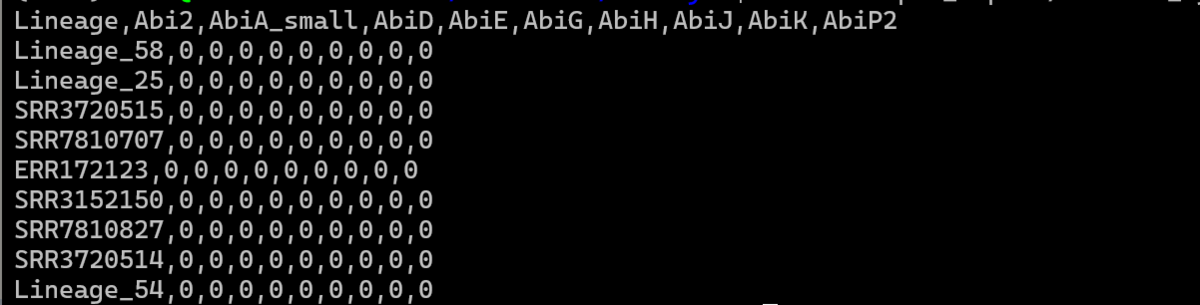
系統樹ファイルと2値形質ファイルを指定する。--run-traitsでどの形質を使うか指定できる(0が最初のカラム)。"--run-traits ALL"で全指定となる。
git clone https://github.com/jpeyemi/SimPhyNI.git
cd SimPhyNI/
simphyni run --sample-name test_analysis \
 --tree example_inputs/Sepi_megatree.nwk \
 --traits example_inputs/defense_systems_pivot.csv \
 --run-traits 1,2,3,4,5 --outdir test_output --cores 4 --min_prev 0.05 --max_prev 0.95 --plot
-
-t Path to a single tree file (single-run mode)
-
--run-traits Comma-separated list of column indices (0 is first trait) in traits CSV specifying traits for a traits against all comparison (Default: 'ALL' for all agianst all)
-
--sample-name Sample name (single-run mode)
-
--min_prev Minimum prevanece required by a trait to be analyzed (recommended: 0.05)
-
--max_prev Maximum prevanece allowed for a trait to be analyzed (recommended: 0.95)
-
-o Main output directory (Default: simphyni_outs)
-
-c Maximum cores for execution (Default: All when not provided)
-
--plot Enable/disable plotting (Default: disabled)
-
--dry-run Perform a dry run without executing
-
--save-object Saves parsable python object containing the complete analysis of each sample (Default: disabled)
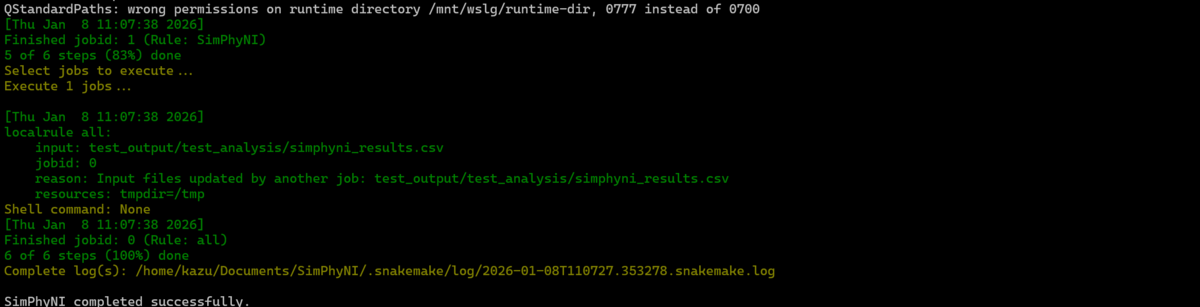
テスト用の小さな系統樹だと、形質ALL指定でも1分以内に計算は終了した(初回は環境構築に時間がかかる)。
出力

simphyni_results.csv

比較されている形質、影響の強さ、正の相関か負の相関か、形質が全サンプル中に存在する割合(min-max optionで調整可)、生のP値、多重比較補正後のP値などが確認できる。
指定した形質それぞれについて、多重検定補正後の相関関係の有意さを示したヒートマップも出力される。灰色は自己比較なので除外、オレンジ(正の相関)と青(負の相関)は色が濃いほど P値が小さいことを意味する。多重検定補正前は少し色が付くが、多重検定補正後はこれらの形質では色がつかなくなっている、
heatmap_uncorrected.png

heatmap_bh.png

heatmap_bonf.png
 heatmap_by.png

引用
High Precision Binary Trait Association on Phylogenetic Trees
Ishaq O Balogun, Christopher P Mancuso, Tami D Lieberman
bioRxiv, Posted December 25, 2025.
関連
